Overview
Report events and incidents in Gearbox, including vehicle accidents and employee-related events. Gearbox enables you to record comprehensive details, such as information on other parties involved if the accident includes another vehicle, as well as police reports and insurance details.
The Employees Module must be active on your subscription to create and manage events in Gearbox.
The Documents Module must be active on your subscription to upload and manage documents in the Events section.
Adding New Events
1. To add or edit an Accident, click on the Employees drop-down (1) and click Events (2).
2. From this screen you can Add New (3) or edit existing events (4).
3. Fill out the required fields Event Type (5), Employee (6) and Event Date (7). More details can be filled in via the details fields (8).
4. Other Party information can be filled out by selecting Other Party (9) and their details can be entered in the available other party fields (10).
5. A Police Report can be filled in by selecting Police (11) and filling in the details in the available Police Report fields (12).
6. To fill in insurance claim details, select Insurance (13) and for the details they are filled in via the available Insurance fields (14).
Add or Edit an Event - New Events - Insurance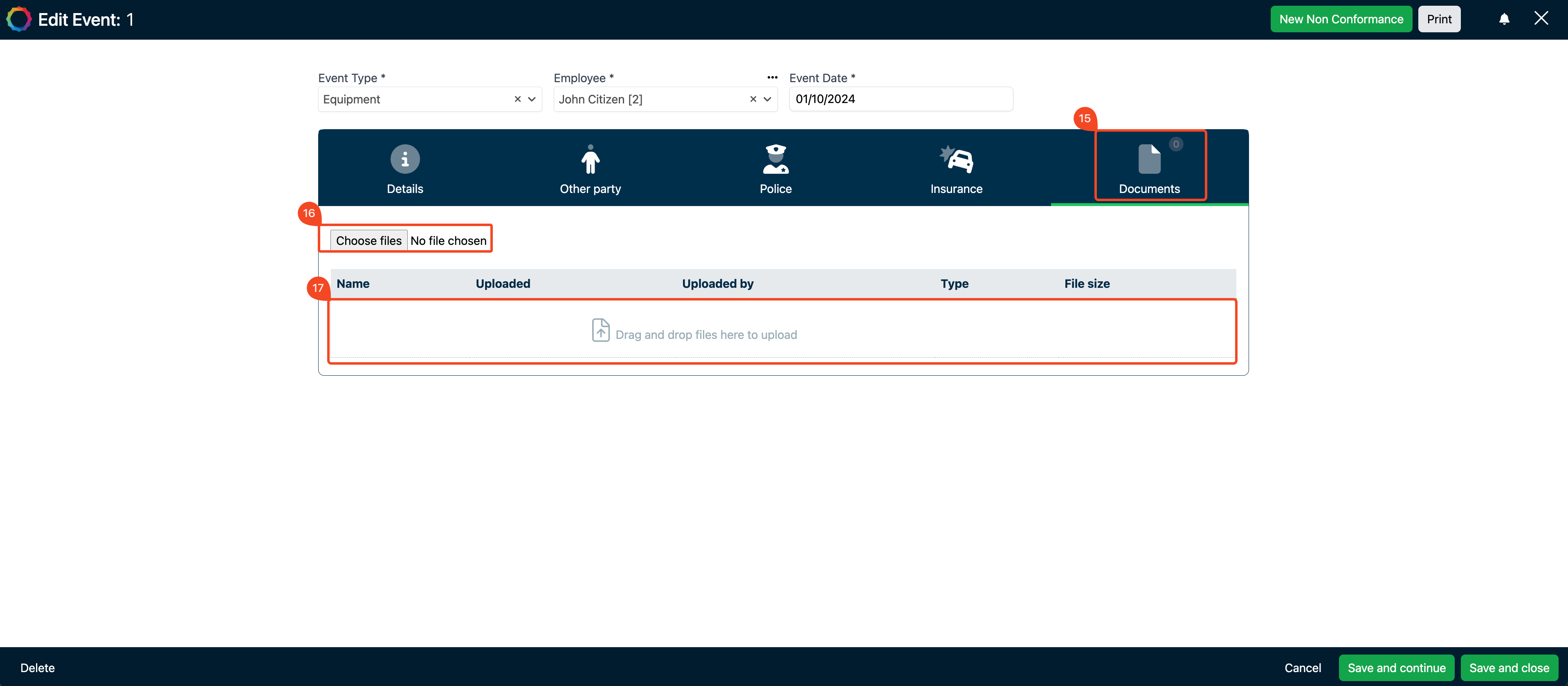
Add or Edit an Event - New Event - DocumentsThe "Documents" tab will only appear once "Save and Continue" is pressed - it will not appear while you are updating details.
7. Documents can be uploaded by selecting Documents (15), new documents are uploaded via Choose files (16) and pre-existing documents are available in the Documents table (17)
Event Types
1. Click on the User Icon (1) then click on Settings (2)
2. Click on Accident Types (3), to add a new event, select Add New Type (4), and to edit new types or delete pre-exisiting types, select them within the Event Type Table (5).
Comments
0 comments
Article is closed for comments.