Overview
Gearbox allows you to track and attach permits of multiple types to multiple vehicles. Gearbox allows you to configure the number of days prior to expiration to receive alerts.
Adding Permit Types
1. To add or edit Permit Types, click on your User Icon (1) then click Settings (2)
If “Settings” is not visible in your menu, contact your system administrator to request access.
2. On the left-hand side scroll down and click on Permit Types (3)
3. From this screen you can Add New Type (4), edit an existing tag (5) or Delete (6)
4. Once you have clicked Add New Type (4) you will be taken to a new screen where you can enter the Permit Type (7) than click Save (8)
Permit Notification Intervals
1. Click on your User Icon (1) then click on Settings (2)
2. Click on System Parameters (3), Search (4) Permits. By changing the Value (5) you will be changing the number of days you will receive a notification
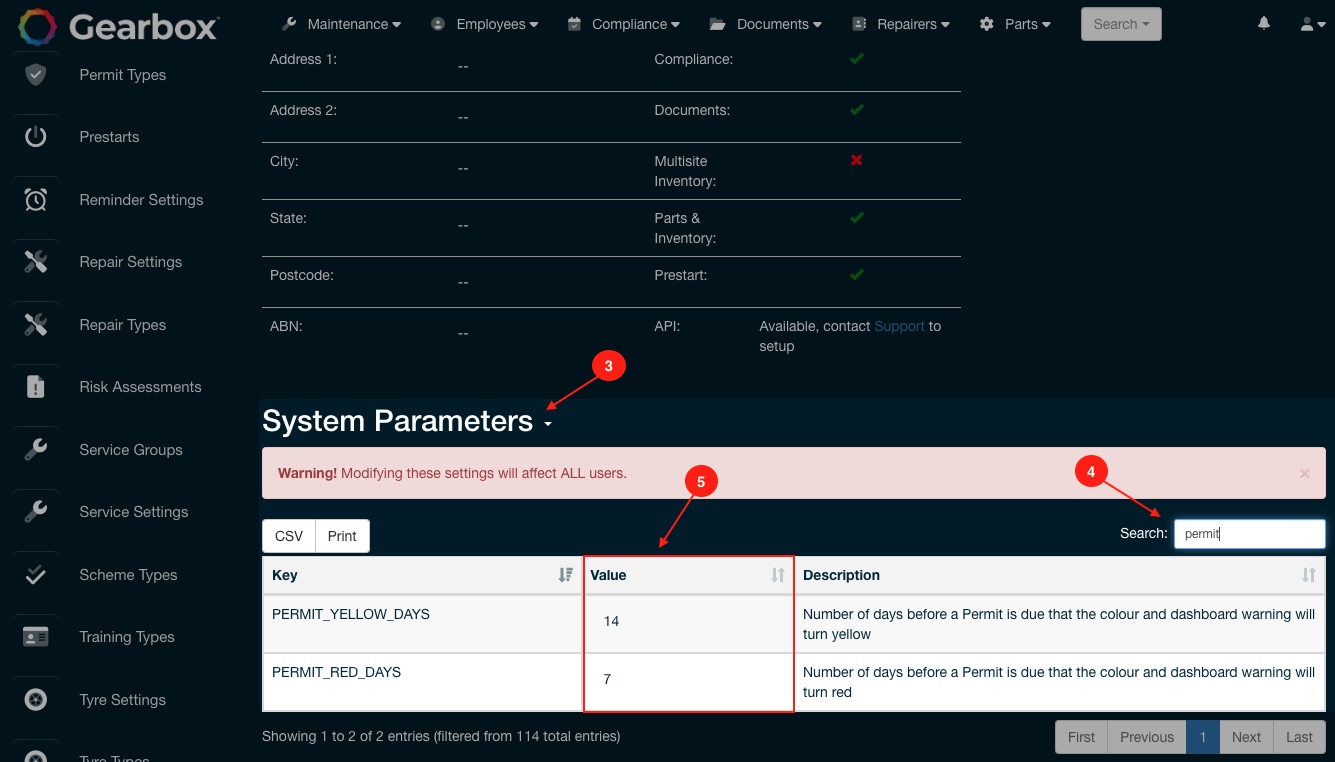 Permit Types and Intervals - Notification Settings
Comments
0 comments
Article is closed for comments.